
Hey amazing educators!
In today’s diverse classrooms, I sometimes find it difficult to provide equitable access and tailored support to each student. That’s why I want to shine a spotlight on a game-changing tool that can truly transform the learning experience for all your students: Read&Write for Google Chrome.
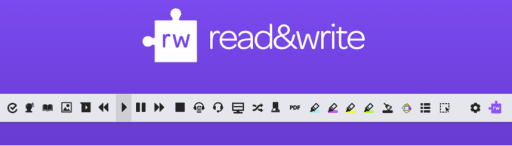
This isn’t just another tech gadget; it’s a comprehensive literacy support toolbar that seamlessly integrates with Google Chrome and your Google Workspace environment. And here’s a little secret for you: it’s FREE for teachers! (Students often access premium features through school licenses, but even the free teacher version offers incredible value).
So let me tell you, what makes the Read&Write Chrome extension a must-have in your digital toolkit?
1. Boosts Reading Comprehension and Fluency
Imagine a student struggling with a complex text. With Read&Write, they no longer have to feel overwhelmed.
- Text-to-Speech: The core feature allows students to hear words, passages, or entire documents read aloud with clear, natural-sounding voices. The dual-color highlighting as the text is read helps students follow along, improving reading fluency and comprehension. This is also a great option for students with specific IEPs.
- Talking Dictionary & Picture Dictionary: When an unfamiliar word pops up, students can instantly get definitions—read aloud! The picture dictionary provides visual cues, which are particularly powerful for visual learners and English Language Learners (ELLs).
- Simplify Page: Overwhelmed by ads and distractions on a webpage? The “Simplify Page” tool cleans up cluttered web content, presenting just the essential text for focused reading.
2. Supports Diverse Learners and Promotes Inclusivity
Read&Write is a prime example of Universal Design for Learning (UDL) in action. It provides scaffolded support that benefits a wide spectrum of learners, including
- Students with Dyslexia: The text-to-speech, screen masking, and word prediction tools can significantly reduce the cognitive load associated with reading and writing.
- English Language Learners (ELLs): The translation tool, picture dictionary, and text-to-speech features help bridge language barriers and accelerate vocabulary acquisition.
- Students with Learning Disabilities (IEPs/504s): It provides essential accommodations, allowing them to engage with content and express their understanding independently.
- All Students: Even proficient readers and writers benefit from features like quick dictionary lookups, highlighting tools for research, and voice notes for brainstorming.
3. Enhances Writing Skills and Confidence
Writing can be daunting for many students. Read&Write provides crucial support throughout the writing process:
- Word Prediction: As students type, Read&Write suggests words, helping them overcome writer’s block, improve spelling, and construct sentences more easily.
- Check It (Grammar and Spell Check): Beyond basic spell check, this tool helps students identify and correct grammar and punctuation errors, fostering better writing habits.
- Talk&Type (Speech-to-Text): For students who struggle with typing or getting their thoughts onto paper, this feature allows them to dictate their ideas, capturing their thoughts quickly and efficiently.
- Vocabulary List Builder: Students can highlight key vocabulary words, and Read&Write automatically generates a vocabulary list with definitions, pictures, and even a space for their own notes – perfect for study.
4. Facilitates Study Skills and Research
Read&Write isn’t just for reading and writing; it’s a powerful study aid:
- Highlighters & Collect Highlights: Students can use different colored highlighters to categorize information while reading. Then, with a click, they can collect all highlighted text into a new Google Doc, making summarizing and note-taking a breeze.
- Voice Notes: Students can record short audio notes directly into a Google Doc, which is excellent for brainstorming, leaving feedback, or self-reflection on their reading.
- Fact Finder: Need to quickly look up more information about a topic? Highlight a word or phrase, click the Fact Finder, and it performs a Google search in a new tab.
5. Seamless Integration and Accessibility
Read&Write for Google Chrome works wonderfully within the Google ecosystem. It functions across Google Docs, Google Slides, Google Forms, websites, and even PDFs and ePub files. This means students have consistent support wherever their digital learning takes them.
In essence, Read&Write for Google Chrome empowers students to become more independent learners, providing them with the tools they need to read, write, and study with confidence. It’s about leveling the playing field and ensuring every student has the opportunity to shine.
If you haven’t explored Read&Write yet, I highly encourage you to install the extension and see for yourself how it can transform your classroom. Your students (and your workload!) will thank you.

Lisa Mashburn, K-8 Classroom Teacher, Lakeland School District 272
15 years in education, a degree in elementary education from the University of Northern Colorado, and a master’s degree from Northcentral University.