
Google Classroom Introduction
Each year, as I prepare for my upcoming class, one of my initial tasks involves establishing my Google Classroom. This process may initially appear daunting, as you contemplate how to organize your classes, add assignments, share resources, and distribute paper assignments.
Initially, Google Classroom may have seemed more chaotic than productive, but over time, I have discovered techniques that have not only enhanced my organization and effectiveness but have also benefited my students and their families. A well-structured learning management system is an essential element for any classroom utilizing technology.
Google Classroom offers a versatile learning management system that affords teachers numerous options for customization. I will provide insights on effectively organizing materials in Google Classroom, optimizing settings, and instructing students on utilizing the system to facilitate rather than hinder their learning experience.
First Tip
It is crucial to ensure that all information, including assignments, tutorials, handouts, and announcements, is consistently posted on Google Classroom. This practice communicates to students and families that Google Classroom serves as a dependable resource for all necessary information. By consistently sharing content on Google Classroom, issues such as absent students struggling to locate assignments, students misplacing work and needing additional copies, and overall accessibility of class resources are significantly mitigated. Moreover, reusing posts from previous years can save you considerable time in the long term.
Second Tip
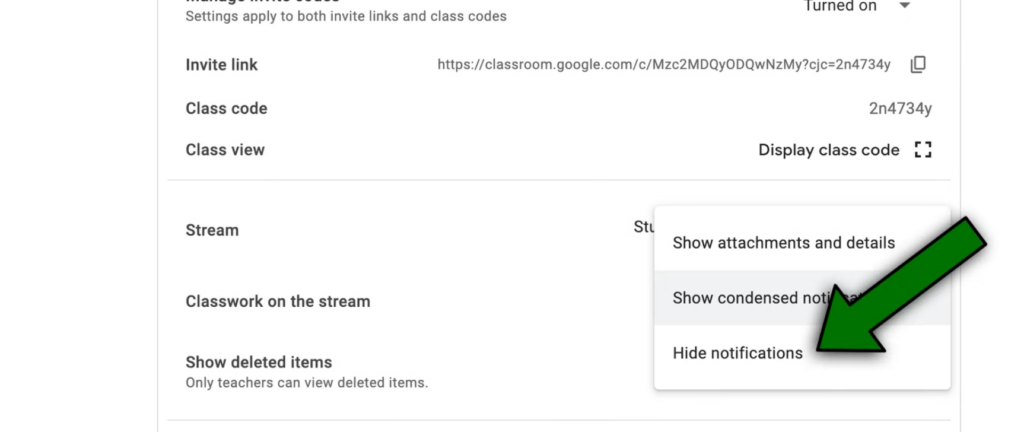
Hide notifications for assignments on the stream to prevent unnecessary clutter. By adjusting the settings to disable notifications, you can maintain a clear distinction between announcements displayed on the stream and assignments accessible through the classwork tab.
Third Tip
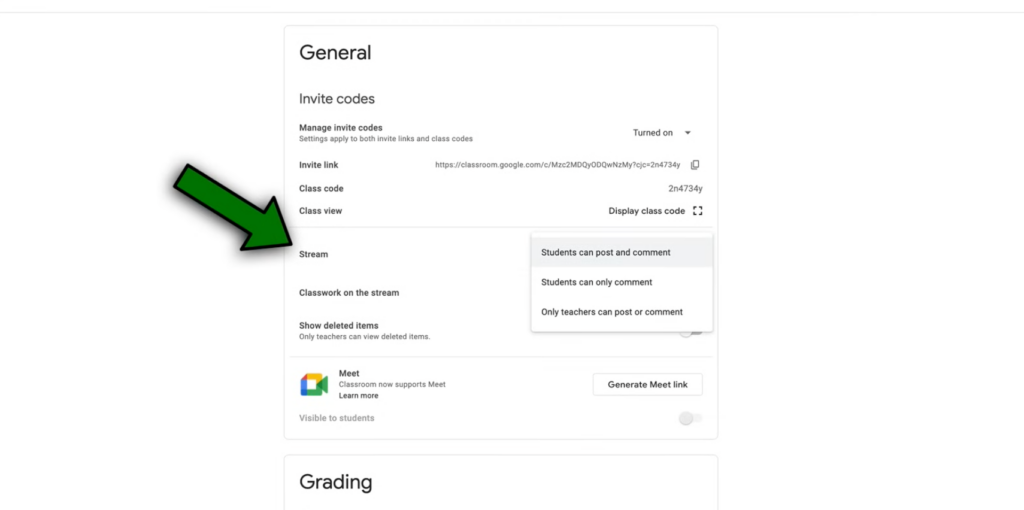
Modify settings to restrict student comments on announcements unless permitted. This adjustment aims to prevent irrelevant student posts from inundating the stream and potentially displaying inappropriate content.
Fourth Tip
Organize topics based on date ranges and a personalized numbering system instead of conventional categories. While topics help maintain organization, arranging them chronologically by weeks and dates simplifies navigation for students, preventing confusion and streamlining access to assignments.
Fifth Tip
Adopt an internal numbering system for assignments instead of specific dates to facilitate reusability and long-term organization. This consistent labeling system benefits both you and your students by simplifying tracking and retrieval of materials.
Sixth Tip
Bundle assignments to minimize the need for students to navigate multiple posts for related tasks. By consolidating content within a single assignment, students can access all necessary materials efficiently.
Seventh Tip
Designate any student resources intended for ongoing access throughout the school year as materials and not assignments. By creating these resources as materials rather than assignments and leaving them unassigned, you ensure their prominent display at the top of Google Classroom, facilitating continuous access for students.
Eighth Tip
Use comment bank feature in Google Classroom to streamline the grading process. By leveraging this tool to store commonly used comments, you can provide feedback more efficiently when assessing student work. After leaving a comment, you can access a feature by clicking on the three dots beside the comment and then choosing to add it to the comment bank. Subsequently, when you wish to use this stored comment, you can simply highlight another section of the document, select the comment option, and begin by typing a hashtag. This action will display the previously saved comment from the bank. This method allows for immediate comment creation. Alternatively, you have the option to pre-compose your comments and save them in the comment bank for future use. It is likely that you have standard comments that you frequently provide on student work throughout the academic year. By preparing these comments in advance in the comment bank, you can easily access them by typing a hashtag when adding feedback to students’ work.
Ninth Tip
Have a colleague log into your Google Classroom to assess its clarity and functionality. Often, when setting up educational platforms, we do so from our own viewpoints. Therefore, it is valuable to seek an external perspective and receive feedback on the organization of your system. To enhance the student-friendliness of Google Classroom, consider coordinating a school-wide initiative where teachers log into each other’s classrooms. This practice ensures alignment in organizational approaches and promotes a consistent student experience across different classes. Standardizing the interface can prevent confusion for students managing multiple classes with varying layouts.
Final Thoughts
Another suggestion is to implement a scavenger hunt activity to familiarize students with your Google Classroom. Even if students claim proficiency in using the platform, there are likely undiscovered features unique to your classroom. Engaging students in a scavenger hunt makes learning interactive and practical, encouraging independent exploration rather than passive instruction. For instance, students could be tasked with locating an announcement in Google Classroom and providing a screenshot as evidence. Additionally, they can explore features like leaving private comments, accessing the to-do list, locating missing assignments, and utilizing the calendar function for a comprehensive overview of their tasks.
These strategies aim to assist in setting up Google Classroom effectively for your students. By incorporating these tips, you can establish a more organized beginning to the academic year, fostering student independence and responsibility as they progress through their educational journey.

Authored by: Lisa Mashburn, K-8 Classroom Teacher Lakeland School District 272
15 years in Education, Degree in Elementary education from the University of Northern Colorado and Master Degree from Northcentral University.